Building data models used to mean long hours of manual coding—carefully crafting pipelines, deciphering data intricacies, and fine-tuning logic to meet every client’s demands.
In this post, we’ll first revisit the traditional approach using Google Cloud Platform (GCP), Dataform for pipeline creation, and GitHub for version control. Then, we’ll introduce a more modern AI-driven method—leveraging Aider and Claude 3.7 Sonnet to automate these tasks.
Imagine setting up your GCP project, configuring data pipelines, and maintaining your codebase—without the usual manual overhead. Instead of getting stuck in repetitive debugging cycles, you’ll shift to an efficient, AI-powered workflow that streamlines SQL development and troubleshooting.
By the end of this guide, you’ll have: ✅ A solid foundation in traditional SQL workflows ✅ A clear understanding of AI-driven automation in data modeling ✅ Step-by-step insights into integrating Aider and Claude 3.7 Sonnet into your workflow
Let’s dive in. 🚀
The Traditional Approach: How Data Models Were Built Before AI
Step-by-Step Process
- Create a Branch – In Google Cloud Platform, navigate to Dataform, create a workspace, and start a new branch for version control.
- Write the Query – Define your SQL logic, ensuring that joins, aggregations, and transformations align with business requirements.
- Execute & Validate – Run the query, check for expected results, and debug any errors manually by tracing issues and adjusting logic.
- Schedule the Query – If everything is correct, set up a schedule to automate execution using Dataform’s built-in scheduling.
- Push to GitHub – Once finalized, commit the changes to GitHub for version control and team collaboration.
- QA & Debugging – Review the results, verify calculations, and handle unexpected outliers that could affect accuracy. If errors arise, repeat the trace-fix-repeat cycle.
- Deploy to Production – Once validated, merge the branch into the main workflow, ensuring that scheduled executions run seamlessly.
The Challenges of This Approach
This process sounds simple—but in reality, it can take hours or even days, especially when dealing with:
- Complex queries that require multi-table joins, aggregations, and client-specific logic.
- Debugging issues that demand manual backtracking and troubleshooting
- Data inconsistencies & outliers that disrupt workflows and require further investigation
What If There Was a Better Way?
- What if your data model was created in minutes instead of days?
- What if the logic was automatically validated for accuracy?
- What if the entire debugging process was handled for you?
Good news: That’s exactly what Aider + Claude 3.7 Sonnet can do. Let’s explore how they transform SQL automation.
What is Aider?
Aider is an AI-powered command-line assistant that seamlessly integrates into your coding workflow. It helps you write, modify, and debug code directly from your terminal.
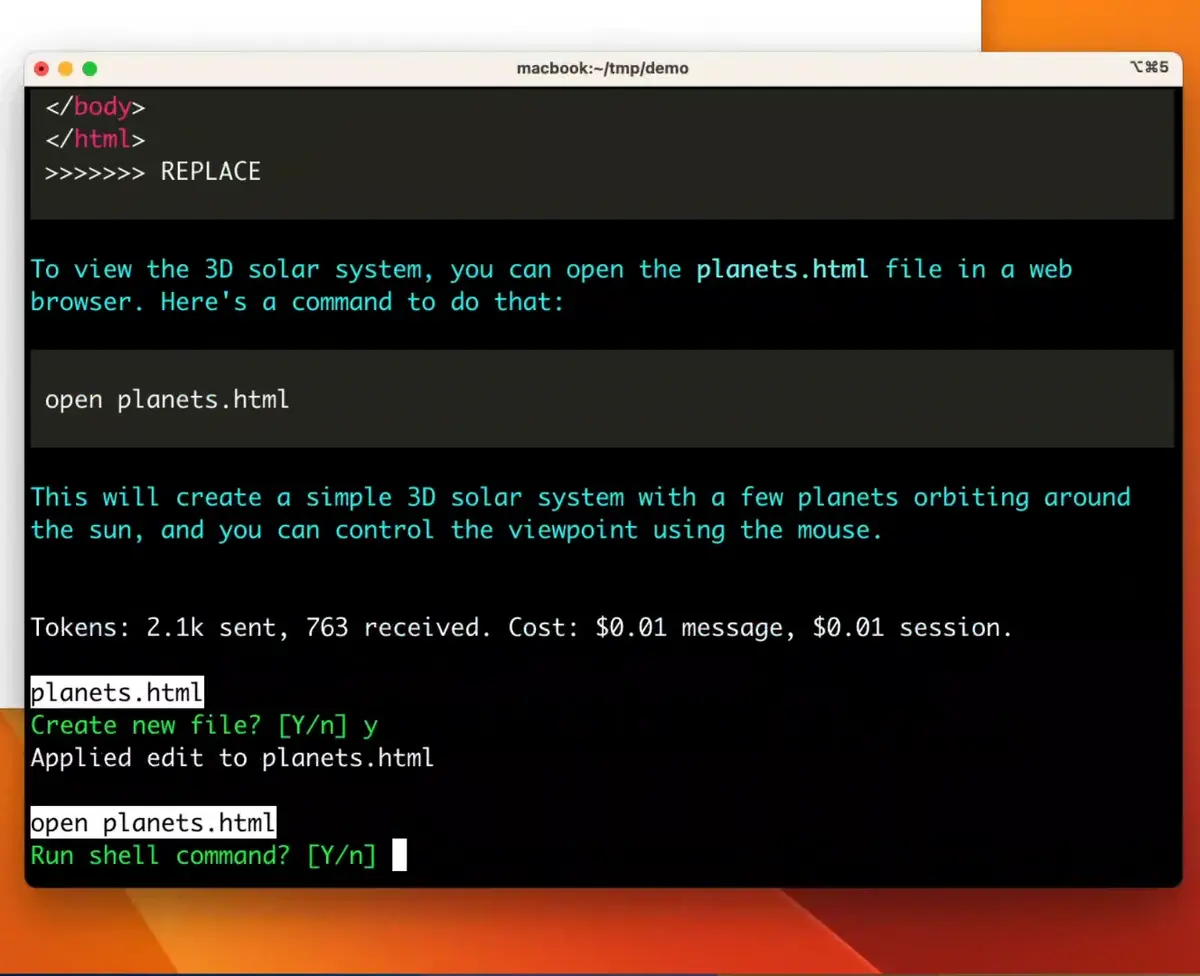 Source:** Aider.chat**
How Aider Enhances Your Workflow
- Instant Coding Assistance – Aider can generate and refine SQL queries based on your prompts, eliminating the need to write complex logic manually.
- Works with Your Existing Codebase – It understands your project structure, schema, and dependencies, making intelligent adjustments where needed.
- Version Control Integration – Aider can automatically commit changes to GitHub, ensuring that every modification is tracked.
- Real-Time Debugging & Fixes – Instead of hunting for syntax errors manually, simply ask Aider to identify and correct issues.
🚀 Why Aider Matters
By eliminating manual coding bottlenecks, Aider frees up your time so you can focus on high-level problem-solving instead of getting stuck in syntax and debugging.
What is Claude 3.7 Sonnet?
Claude 3.7 Sonnet is an advanced AI assistant designed to understand complex logic, optimize queries, and enhance SQL workflows.
How Claude 3.7 Sonnet Enhances Your Workflow
- Understands Schema & Business Logic – Claude can analyze data structures and suggest optimal query logic based on best practices.
- Handles Complex Joins & Aggregations – If you struggle with multi-table joins, aggregation rules, or edge cases, Claude provides structured, logic-driven solutions.
- Explains & Optimizes Queries – Instead of trial-and-error debugging, Claude pinpoints issues in your SQL and suggests improvements.
- Automates Documentation – Claude can generate query explanations, workflow summaries, and documentation, saving time on reporting and compliance.
Why Claude 3.7 Sonnet Matters
Most AI tools can generate SQL queries, but few truly understand the complex logic of data modeling.
Claude doesn’t just write code—it validates, optimizes, and explains it, ensuring your workflows are scalable and efficient.
📊 How Does Claude Compare to Other AI Models?
Claude 3.7 Sonnet isn’t just another AI tool—it has been benchmarked against top AI models and has shown exceptional performance, especially in coding-related tasks.
📈 Performance Benchmark:
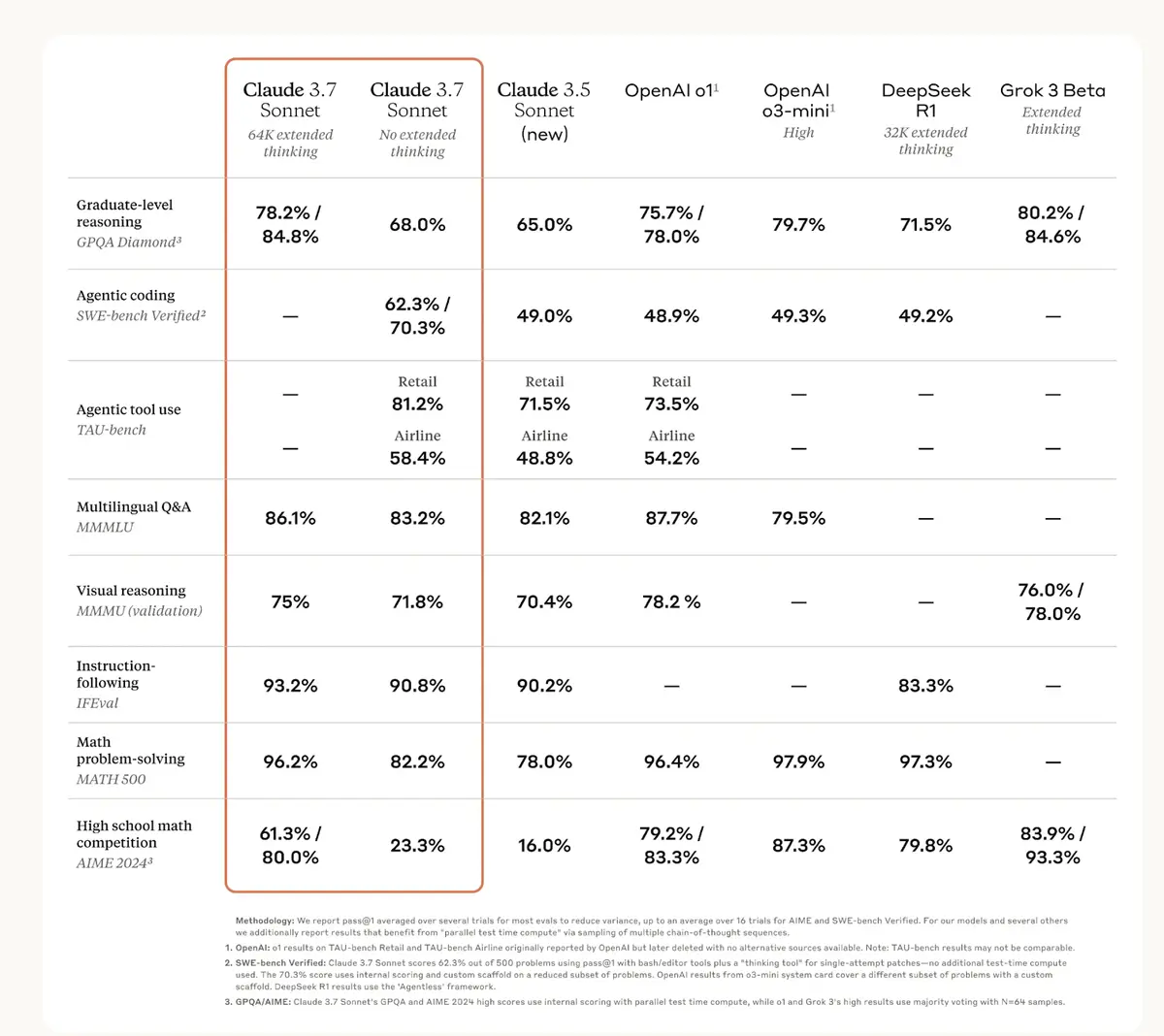 Source: https://www.anthropic.com/news/claude-3-7-sonnet (screenshot taken on 2025.03.25)
This high-level reasoning capability is what makes Claude so effective in assisting with complex SQL queries and debugging workflows.
Note: By the time we were writing our blog post on Claude 3.7 Sonnet, Gemini 2.5 Pro had already outperformed Claude 3.7 Sonnet in benchmark tests.
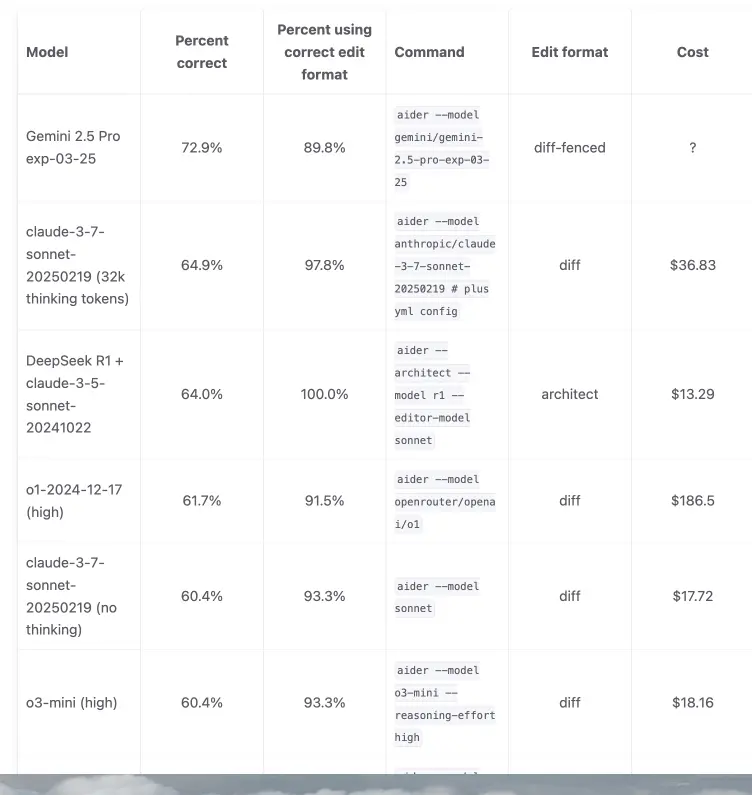
AI advancements are moving fast, and keeping up with the latest model updates can be challenging. If you're interested in comparing their performance across different tasks, you can check out the latest benchmark results here.
Installation
To install Aider and set up Claude for use on your local system, follow these steps. These instructions are specifically for macOS, but the process may be similar for other operating systems with slight modifications.
**1. **Homebrew installation
Homebrew is a package manager for macOS that simplifies software installation. Run the following command to install Homebrew:
/bin/bash -c "$(curl -fsSL https://raw.githubusercontent.com/Homebrew/install/HEAD/install.sh)"
**2. **Visual Studio Code installation
VS Code is a lightweight yet powerful code editor that supports various extensions. Install it using Homebrew:
brew install --cask visual-studio-code
**3. **pipx installation
Pipx is a handy tool for installing and running Python command-line applications in isolated environments. It helps keep your global Python environment clean and makes managing CLI tools much easier.
brew install pipxpipx ensurepath
Restart your terminal after installing pipx
**4 Aider installation **
Aider is an AI-assisted coding tool that integrates with large language models like Claude 3.7 Sonnet and GPT-4o to help with development tasks. Install it using pip:
pipx install aider-install
Then execute the following:
aider-install
Use one of the following commands to start Aider, replacing your-key-goes-here with your actual API key:
# Work with Claude 3.7 Sonnet via Anthropic's APIaider --model sonnet --api-key anthropic=your-key-goes-here# Work with GPT-4o via OpenAI's APIaider --model gpt-4o --api-key openai=your-key-goes-here
Claude-3-7-sonnet-20250219 (32k thinking tokens):
aider --model anthropic/claude-3-7-sonnet-20250219 --api-key anthropic=your-key-goes-here # plus yml config
For Claude 3.7 Sonnet a yaml configuration file is required, in which you can specify the number of thinking tokens, this is an example for 32k thinking tokens:
Create this file in the root folder (remember to include the dot (.) at the beginning) with the exact name and content provided below.
Filename:
.aider.model.settings.yml:
- name: anthropic/claude-3-7-sonnet-20250219 edit_format: diff weak_model_name: anthropic/claude-3-5-haiku-20241022 use_repo_map: true examples_as_sys_msg: true use_temperature: false extra_params: extra_headers: anthropic-beta: prompt-caching-2024-07-31,pdfs-2024-09-25,output-128k-2025-02-19 max_tokens: 64000 thinking: type: enabled budget_tokens: 32000 # Adjust this number cache_control: true editor_model_name: anthropic/claude-3-7-sonnet-20250219 editor_edit_format: editor-diff
You've successfully set up Aider and configured Claude on your local system. Now, you're ready to explore its capabilities and streamline your workflow.
Implementation
To demonstrate the implementation we are using a dummy table - employee_sale. You can experiment with your own data, and if you're new to the whole process, you can download any public dataset available. Here is a useful resource you can use to access public data online.
Once the installation is complete, few things to check before you start your implementation:
- Make sure to be inside your Google project in Visual Studio Code
- Make sure you are in the right branch
Open your terminal in the VS Code, and run this command
# Work with Claude 3.7 Sonnet via Anthropic's APIaider --model sonnet --api-key anthropic=your-key-goes-here
Note: Every time you open a new terminal, make sure to run this command.
Once you’re inside the aider environment, you will have several options: /add, /ask, /undo, /chat-mode etc. If you want to learn more about specific commands, use this Tips from Aider.

So, let’s begin by adding a file to the knowledge base,
*/add - Lets you add the file to its knowledge base *
For example */add **, will add all your files and schema into its knowledge base, and become ‘context-aware’
You can also opt to add just the specific file for example /add definitions/01_raw/employee_sales.sqlx
Once your files are added to the knowledge base, you can start asking questions by using /ask
Here’s an example prompt:/ask which employee has the most sales?
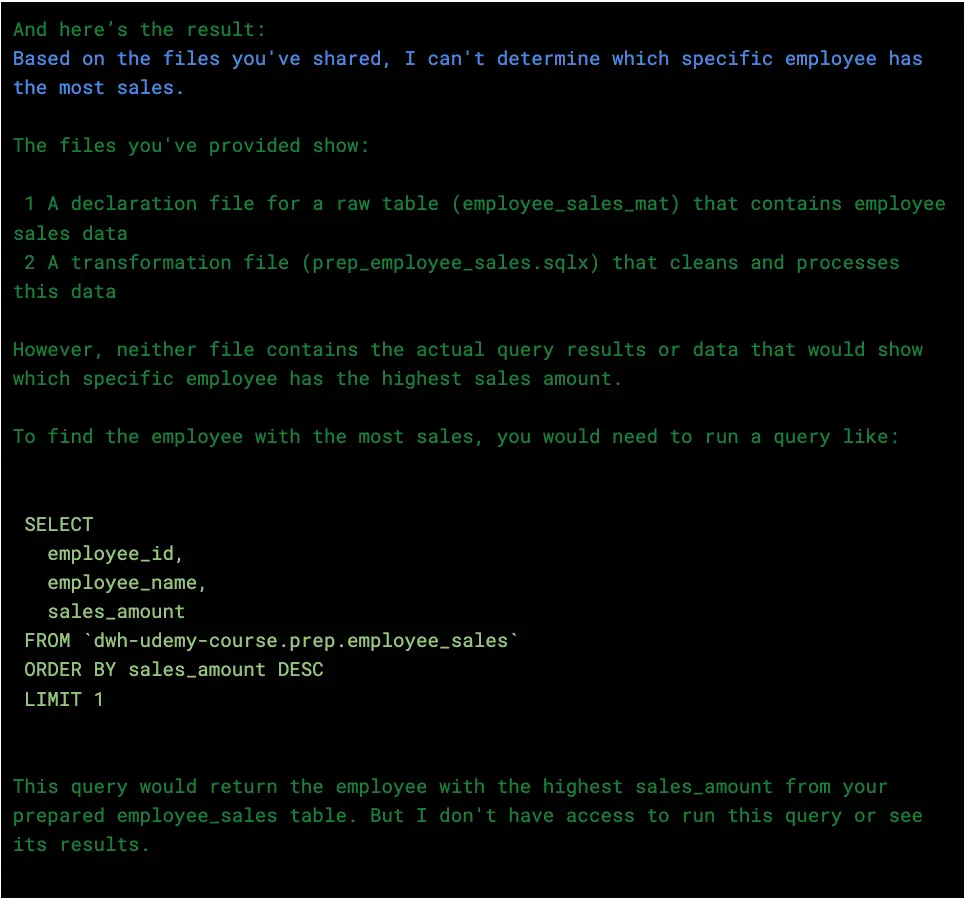
With just a few simple steps, you've successfully set up Aider and integrated it with Claude 3.7 Sonnet. Now, you can effortlessly interact with your data, ask insightful queries, and streamline your workflow with AI-powered assistance. Imagine how much time you'll save and how efficient your processes will become! Pretty amazing, right?
Conclusion
You’ve now seen what’s possible when you combine traditional data modeling workflows with cutting-edge AI assistants like Claude 3.7 Sonnet and Aider. What once took hours—or even days—can now be handled in minutes, with fewer errors and greater clarity.
Deploying these tools locally gives you complete control, privacy, and flexibility—whether you're building pipelines, debugging complex SQL logic, or generating clean documentation.
More to read
If you enjoyed this blog, you'll love these too! Dive into more captivating content:
Upgrade Your ls Command to eza
Latest Updates on Google Data Analytics
Your AI Companion in the Google Cloud
Awakening the Data Messenger by Integrating BigQuery with Slack
Further Links
Check out our LinkedIn account, to get insights into our daily working life and get important updates about BigQuery, Data Studio, and marketing analytics.
We also started with our own YouTube channel. We talk about important DWH, BigQuery, Data Studio, and many more topics. Check out the channel here.
If you want to learn more about using Google Data Studio and taking it to the next level in combination with BigQuery, check out our Udemy course here.
If you are looking for help setting up a modern and cost-efficient data warehouse or analytical dashboard, email us at hello@datadice.io and we will schedule a call.