In this blog post, I want to summarize the new releases from the Google tools that we use daily in datadice. Therefore, I want to give an overview of the new features of BigQuery, Dataform, Looker Studio, Google Analytics, and Google Tag Manager. Furthermore, I will focus on the releases that I consider to be the most important ones, and I will also name some other changes that were made.
If you want to take a closer look, here you can find the Release Notes from BigQuery, Dataform, Looker Studio, Google Analytics & Google Tag Manager.
BigQuery
Parameterized queries
Users can now configure and execute parameterized queries directly within the BigQuery query editor in the Google Cloud console. This update simplifies the process of writing and testing dynamic SQL. To pass parameters in the query editor:
- Open the BigQuery query editor in your Google Cloud console
- Click on the "More" option in the query editor toolbar and select "Query settings"
- Locate the "Query parameters" section and click "Add parameter" to define the name, data type, and value
- You can use the configured parameter in the SQL code by prefixing the parameter name with an @ symbol (e.g., @parameter_name)
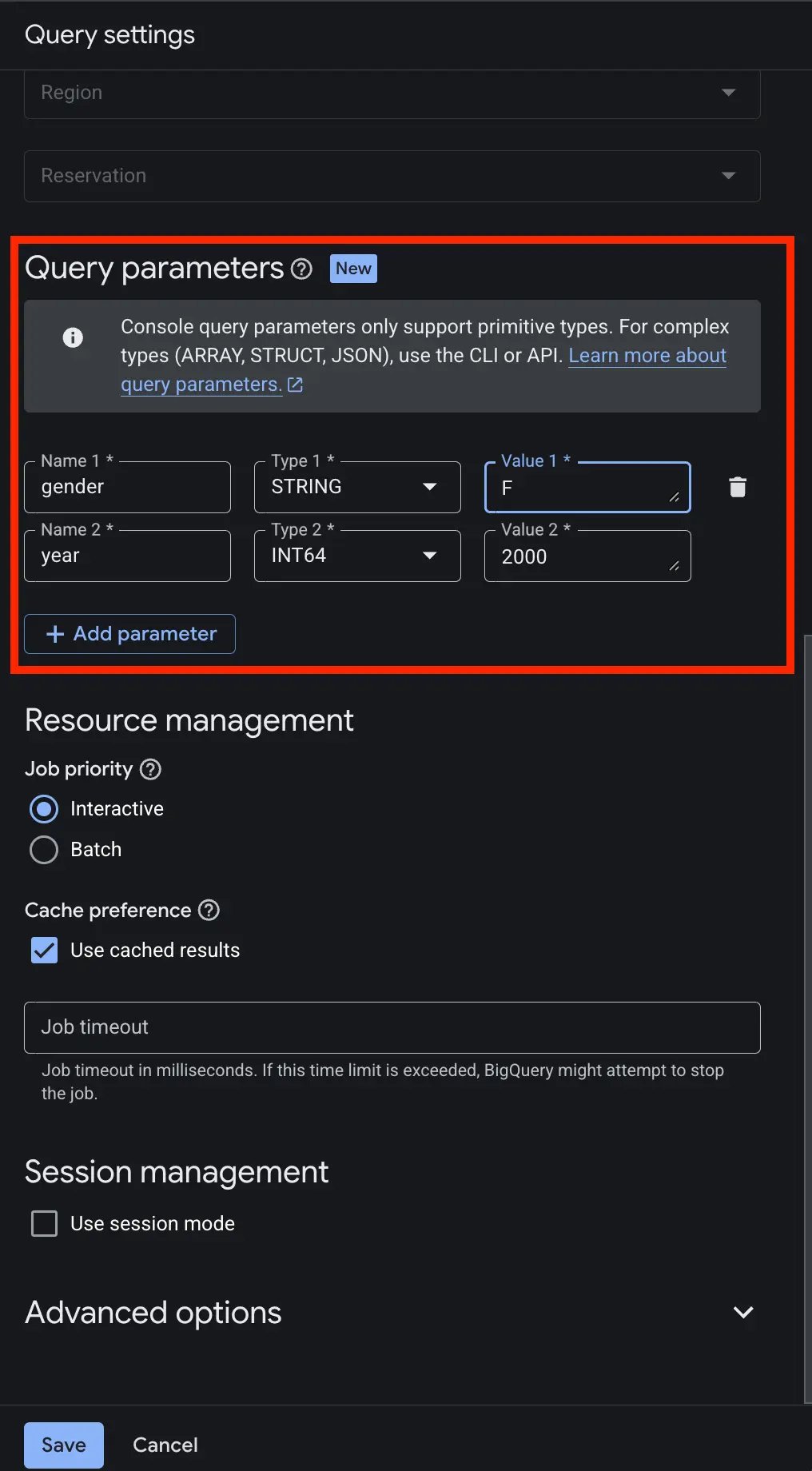
And this is the corresponding query:
SELECT
  name,
  SUM(number) AS amount
FROM `bigquery-public-data.usa_names.usa_1910_2013`
WHERE
  gender = @gender
  AND year = @year
GROUP BY 1
ORDER BY 2 DESC
In these query parameters, you can just add simple datatypes like String, Integer, Float, Date, …
Parameters with the types array, struct, and ranges can be just created and used in the BigQuery CLI.
Example:
bq query \
--use_legacy_sql=false\
--parameter='gender::F'\
--parameter='states:ARRAY<STRING>:["WA", "WI", "WV", "WY"]'\
'SELECT
    name,
    SUM(number) AS count
  FROM `bigquery-public-data.usa_names.usa_1910_2013`
  WHERE
    gender = @gender
    AND state IN UNNEST(@states)
  GROUP BY name
  ORDER BY 2 DESC
  LIMIT 10;'
More information can be found here.
Global queries
Google has introduced "Global queries," a new feature that lets you query data distributed across multiple geographic locations with a single SQL statement.
BigQuery automatically handles the cross-region orchestration, running optimized sub-queries in remote regions and securely transferring only the necessary filtered data to the primary execution region to deliver a unified result.
The project where the global query is located and needs data from other projects requires the active enable_global_queries_execution option.
ALTER PROJECT `project_id`
SET OPTIONS (
  `region-europe-west3.enable_global_queries_execution` = TRUE
);
The project from which you get data requires the active enable_global_queries_execution option.
ALTER PROJECT `project_id`
SET OPTIONS (
  `region-europe-west3.enable_global_queries_data_access` = TRUE
);
Note: These global queries can lead to higher costs than expected before. The final costs are the sum of the costs from
- every subquery in the remote locations
- the final query
- Copying data between the regions
- Storing the copied data in the primary region for 8 hours
More information can be found here.
Further changes
- Enhanced AI functions: The AI.GENERATE and AI.GENERATE_TABLE functions now allow you to provide descriptions for fields in your custom output schema, while the AI.CLASSIFY function has been upgraded to support multi-category classification for your inputs.
- Undelete datasets: You can now easily recover a deleted dataset to its exact state at the time of deletion, provided the action is performed within your configured time travel window. More information can be found here.
- Custom glossary for conversational agents: To help conversational analytics agents better interpret your specific prompts, you can now create and review custom glossary terms directly in BigQuery, as well as import business glossary terms from the Dataplex Universal Catalog.
Dataform
No further release for Google Tag Manager.
Looker Studio
Conversational Analytics reasoning
Looker Studio has enhanced its Conversational Analytics tool by providing transparency into how the AI interprets user queries. Users can now access a "Show reasoning" feature that provides a plain-text explanation of the logic used to generate a specific data visualization or response. This includes details on how key terms were mapped to specific dimensions and metrics, which filters were applied, and the duration of the processing time. To view the analytical reasoning:
- Enter your prompt in the Conversational Analytics interface
- Once the response is generated, click the "Show reasoning" button located above the output
- Click "Hide reasoning" to collapse the detailed explanation again
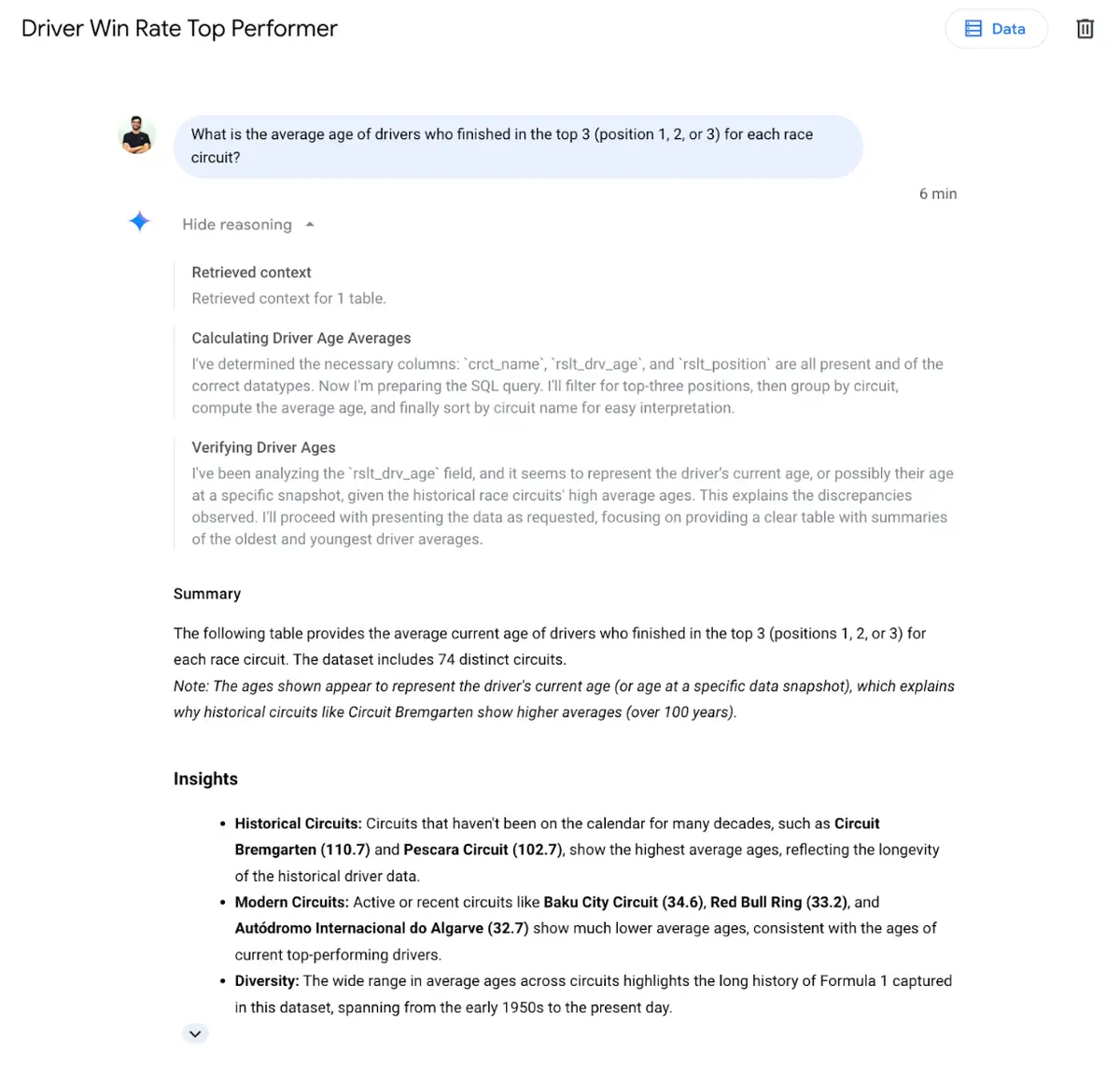
More information can be found here.
Further changes
- Looker Studio Pro for Google Workspace: Subscriptions for Looker Studio Pro can now be directly purchased and centrally managed through your Google Workspace Admin console. More information can be found here.
- Change Pro billing accounts: Administrators can now seamlessly switch the Google Cloud billing account associated with their Looker Studio Pro subscription without any access downside. More information can be found here.
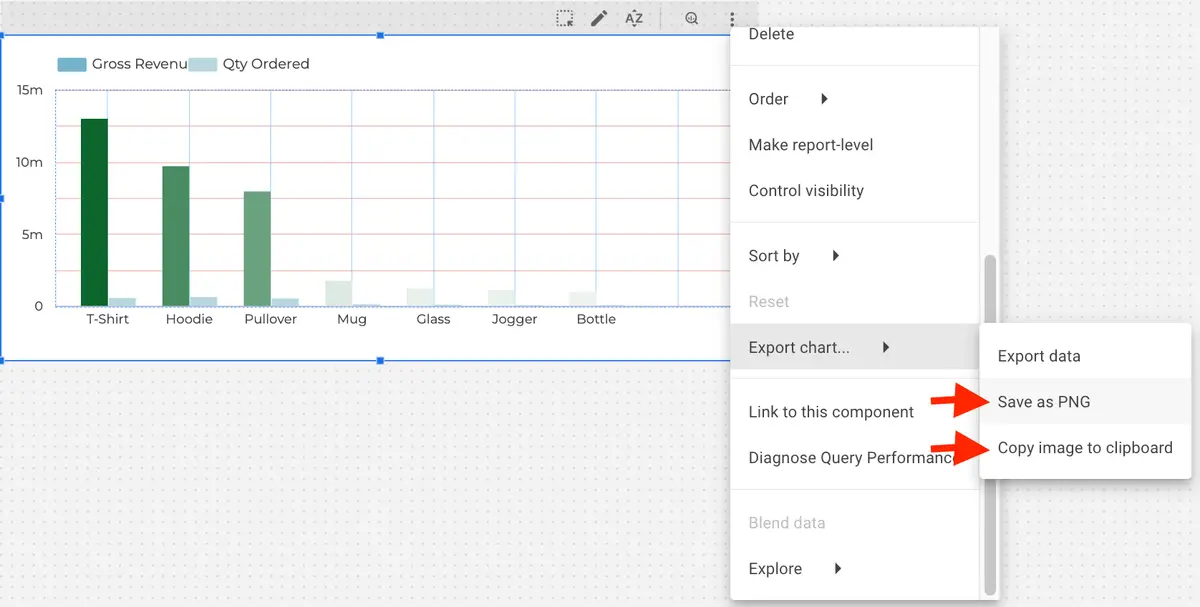
- Export charts as images: Individual charts can now be easily saved as a PNG file or copied directly to your clipboard for quick external sharing. More information can be found here.
- Direct links to report components: You can now generate and share specific URLs that route users directly to an individual component, such as a chart or control element, within a report. More information can be found here.
- Expanded search parameters: Finding reports and data sources on the homepage is now easier, as results can be specifically filtered by Type, Owner, Location, and Date Modified. More information can be found here.
Google Analytics
New Insights on Home page
Google has introduced a new "Generated insights" feature directly on the Google Analytics Home page. This AI-supported tool summarizes the top three data changes observed since your last visit. The insights highlight key configuration updates, anomalies, and seasonality trends to help users identify significant performance shifts immediately.
To use this feature:
- Navigate to the Home page of your Google Analytics 4 property.
- In the upper section of the page, the Generated Insights are shown
So far, I do not see these insights, maybe it still takes a while until they show up in all properties.
The generated insights on the detailed reports are still shown as well.
Google Tag Manager
Improved event collection for Google Ads
There is an automated enhancement for website event data collection. This update allows Google Ads to capture a wider range of event data directly from websites with minimal manual configuration.
This update should lead to more event which are tracked automatically and/or more data sent with the existing events.
Further Links
This post is part of the Google Data Analytics series from datadice and explains to you every month the newest features in BigQuery, Data Studio, Google Analytics, and Google Tag Manager.
Check out our LinkedIn account to get insights into our daily working life and get important updates about BigQuery, Looker Studio, and marketing analytics.
We also started with our own YouTube channel. We talk about important DWH, BigQuery, Looker Studio, and many more topics. Check out the channel here.
If you want to learn more about how to use Google Data Studio and take it to the next level in combination with BigQuery, check our Udemy course here.
If you are looking for help to set up a modern and cost-efficient data warehouse or analytical dashboards, send us an email to hello@datadice.io, and we will schedule a call.