In this blog post, I want to summarize the new releases from the Google tools that we use daily in datadice. Therefore, I want to give an overview of the new features of BigQuery, Dataform, Looker Studio, Google Analytics, and Google Tag Manager. Furthermore, I will focus on the releases that I consider to be the most important ones, and I will also name some other changes that were made.
If you want to take a closer look, here you can find the Release Notes from BigQuery, Dataform, Looker Studio, Google Analytics & Google Tag Manager.
BigQuery
Syntax changes for VECTOR_SEARCH
Google introduced an alternate syntax for the VECTOR_SEARCH function, specifically optimized for single-vector searches. Previously, the function was primarily designed to handle batch searches by passing a query table. The new syntax allows you to pass a single query value directly using the query_value parameter, avoiding the need to construct a single-row table.
This enhancement provides the following benefits:
- Improved query performance compared to using the batch version for a single row.
- Reduced query runtime and cost for common single-query patterns.
- Less slot time usage and lower per-query charges for vector workloads at scale.
The updated syntax for searching a single vector is structured as follows:
VECTOR_SEARCH(
  TABLE base_table,
  'column_to_search',
  query_value => single_query_value,
  top_k => 5
)
More information can be found here.
Conversational Analytics changes
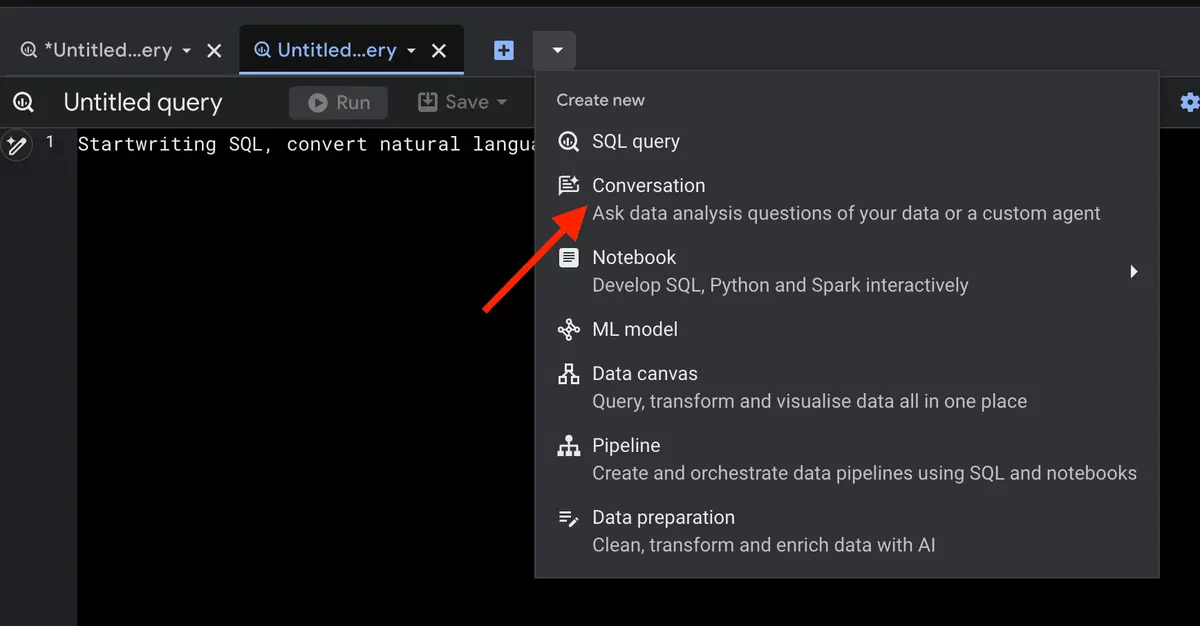
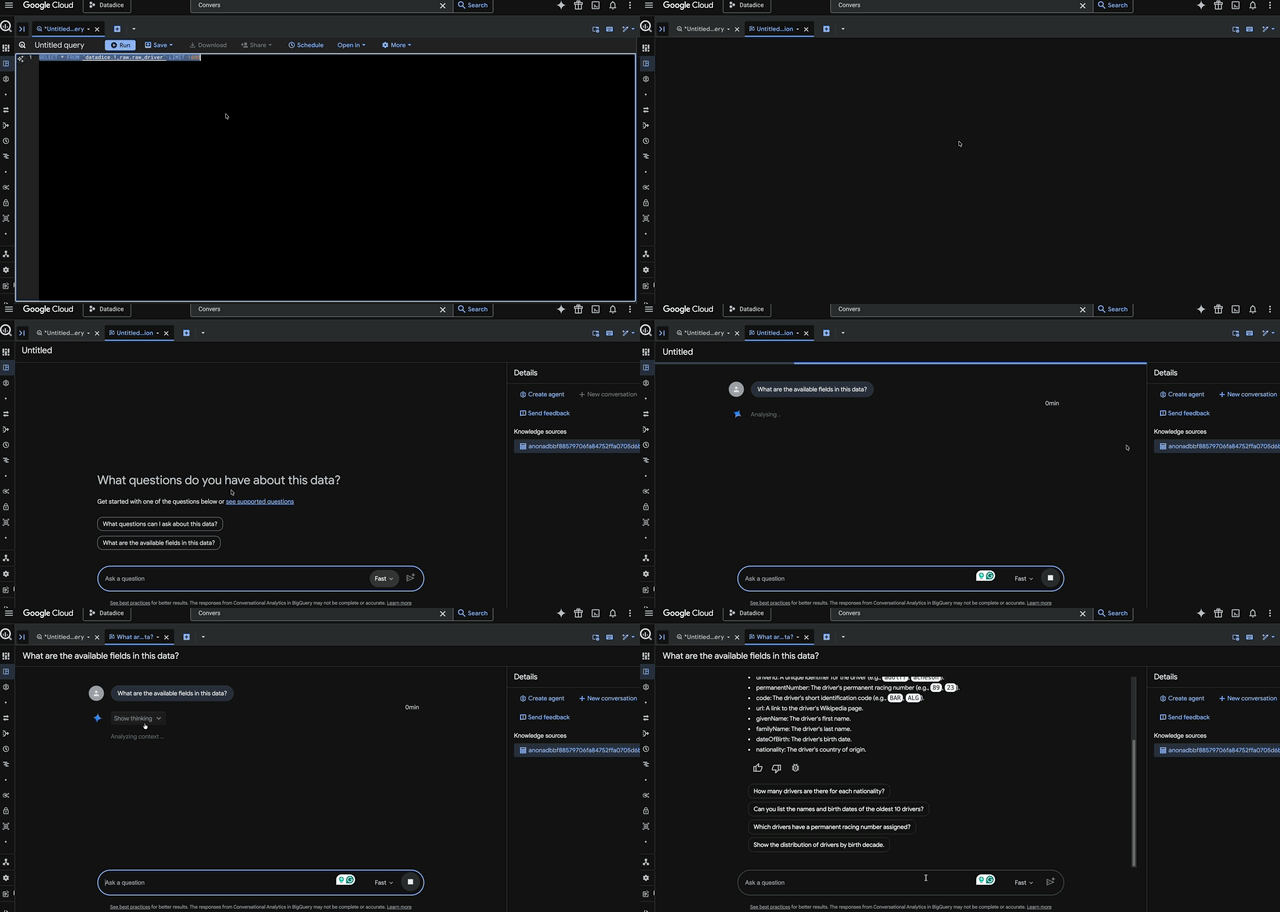
Google expanded the conversational analytics capabilities within BigQuery. To start conversational analytics, you need to click here:
The most important enhancements include:
- Integration of unstructured data: Through new ObjectRef functions, the AI assistant can now directly access files stored in Google Cloud Storage. This allows you to include documents like PDFs and images in the analysis.
- Expanded BigQuery ML capabilities: The agent supports advanced AI functions, such as
AI.GENERATE,AI.FORECAST, andAI.DETECT_ANOMALIES. - Direct interaction with query results: Users can now initiate a conversation directly concerning the output of their SQL queries within the BigQuery Studio editor.
- Cost-efficient queries via partitioning: The conversational agent automatically recognizes partitioned tables and uses relevant columns, such as date ranges, to generate optimized SQL code. This improves query speed and noticeably reduces execution costs.
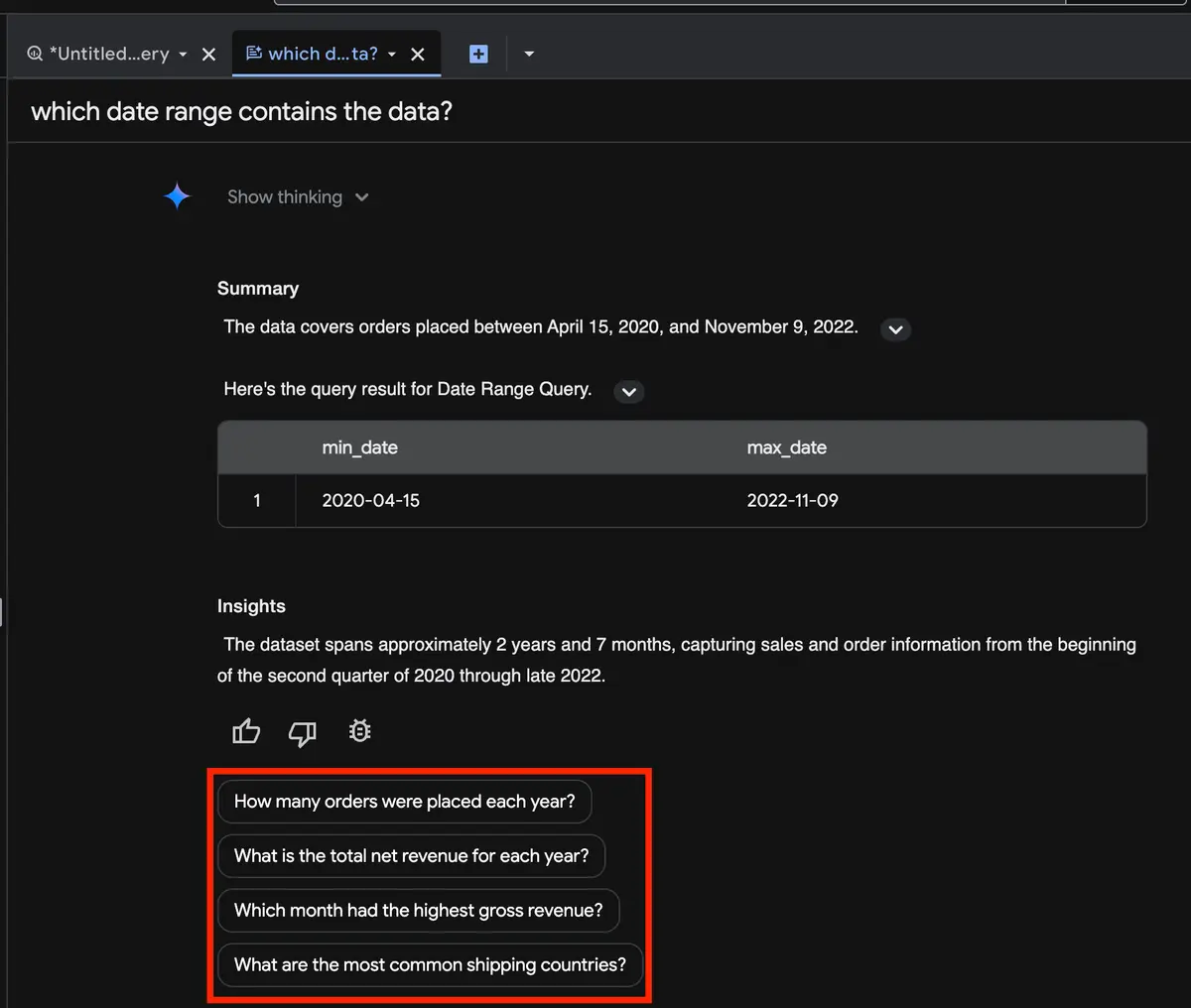
- Interactive follow-up questions: The agent delivers context-aware next questions that can be executed with a single click in the Google Cloud Console.
More information can be found here.
BigQuery Data Transfer Service remote MCP Servers
Google has introduced the BigQuery Migration Service MCP (Model Context Protocol) server, designed to assist users with various SQL translation tasks directly. This tool simplifies migrating and adapting SQL code for BigQuery.
With the new MCP server, you can perform the following tasks:
- Translate existing SQL queries from other dialects directly into standard Google SQL syntax.
- Generate Data Definition Language (DDL) statements based on your SQL input queries.
- Obtain detailed explanations for the provided SQL translations to understand the syntax changes and underlying logic better.
More information can be found here.
AI Function changes
Google introduced new parameters for some of the AI functions.
The updates include the following enhancements:
AI.DETECT_ANOMALIES: You can now set a custom context window to determine exactly how many of the most recent data points the model should evaluate (Parameter =context_window).AI.FORECAST: This function now allows you to explicitly specify the latest timestamp to use for forecasting (Parameter =forecast_end_timestamp).AI.EVALUATE: Provide a custom context window to define the number of recent data points used by the model (Parameter =context_window). Additionally, the function now outputs the mean absolute scaled error for the analyzed time series (output column =mean_absolute_error).
Further changes
BigQuery got a few more updates I want to mention:
- Global default location: Configure a global default location at either the organization or project level, which will be automatically applied when no specific location is provided or cannot be directly inferred from your request.
ALTER ORGANIZATION SET OPTIONS (
  `default_location` = EU
)

;

ALTER PROJECT SET OPTIONS (
  `default_location` = EU
)
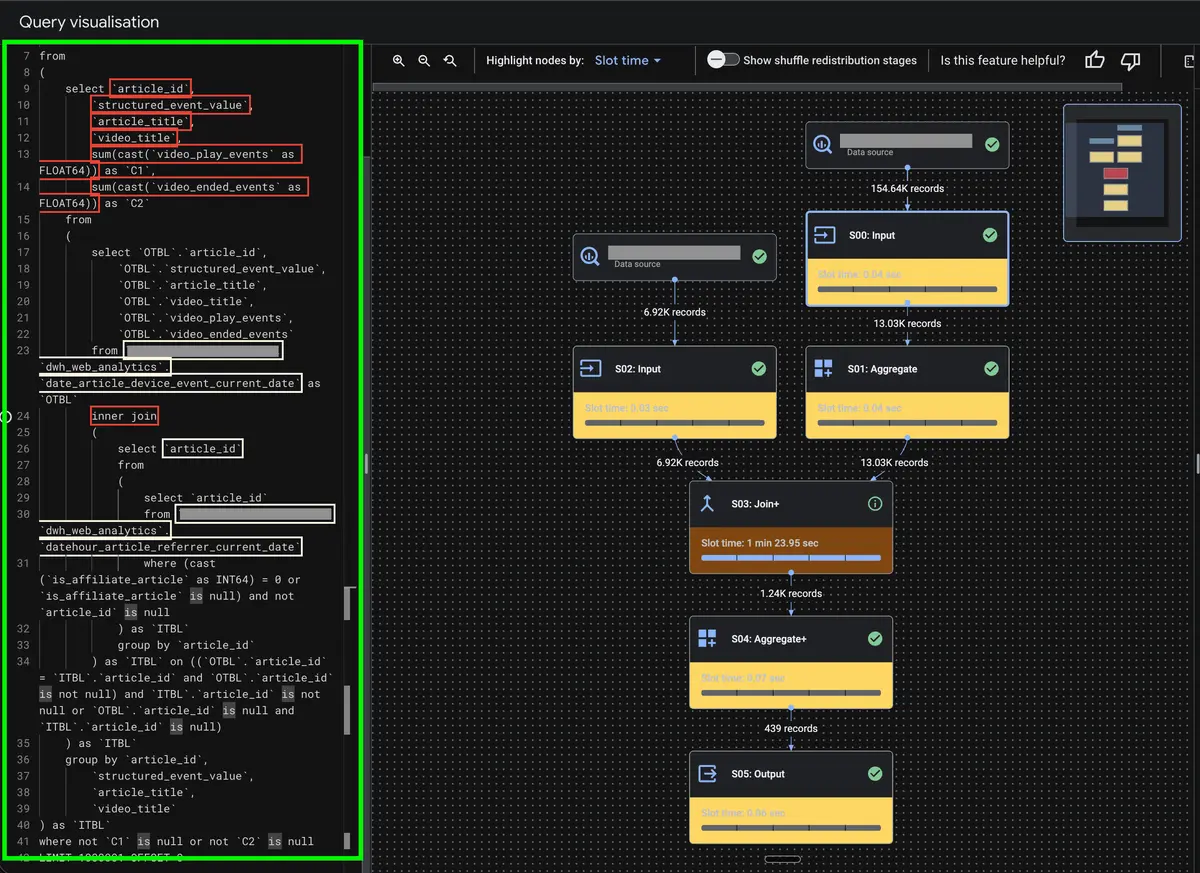
- Visual mapping in query performance: A visual mapping of SQL queries within the query execution graph to help users better understand and debug query performance, including a new heatmap functionality that highlights the specific execution steps consuming the most slot-time.
- Automatically deploy open models: BigQuery ML now allows you to automatically deploy open models to Vertex AI endpoints, offering benefits such as automated Vertex AI resource management, the ability to use Compute Engine reservations, and automatic or immediate model undeployment to optimize costs.
- Migration assessment for Snowflake: There is a new member in the migration assessment family: Snowflake. If you want to migrate your Snowflake infrastructure to BigQuery, you get some support here.
Dataform
No further release for Dataform.
Looker Studio
CSV connector changes
In October 2025, a few enhancements for the CSV connector were announced, but just for Pro users.
These changes are now available to all users. More information can be found here.
Google Analytics
No further release for Google Analytics.
Google Tag Manager
No further release for Google Tag Manager.
Further Links
This post is part of the Google Data Analytics series from datadice and explains to you every month the newest features in BigQuery, Data Studio, Google Analytics, and Google Tag Manager.
Check out our LinkedIn account to get insights into our daily working life and get important updates about BigQuery, Looker Studio, and marketing analytics.
We also started with our own YouTube channel. We talk about important DWH, BigQuery, Looker Studio, and many more topics. Check out the channel here.
If you want to learn more about how to use Google Data Studio and take it to the next level in combination with BigQuery, check our Udemy course here.
If you are looking for help to set up a modern and cost-efficient data warehouse or analytical dashboards, send us an email to hello@datadice.io, and we will schedule a call.