In this blog post, I want to summarize the new releases from the Google tools that we use daily in datadice. Therefore, I want to give an overview of the new features of BigQuery, Dataform, Data Studio, Google Analytics, and Google Tag Manager. Furthermore, I will focus on the releases that I consider to be the most important ones, and I will also name some other changes that were made.
If you want to take a closer look, here you can find the Release Notes from BigQuery, Dataform, Data Studio, Google Analytics & Google Tag Manager.
BigQuery
Trigger-based scheduling
Google BigQuery now allows you to configure pipeline executions to trigger automatically whenever specific monitored BigQuery tables are updated.
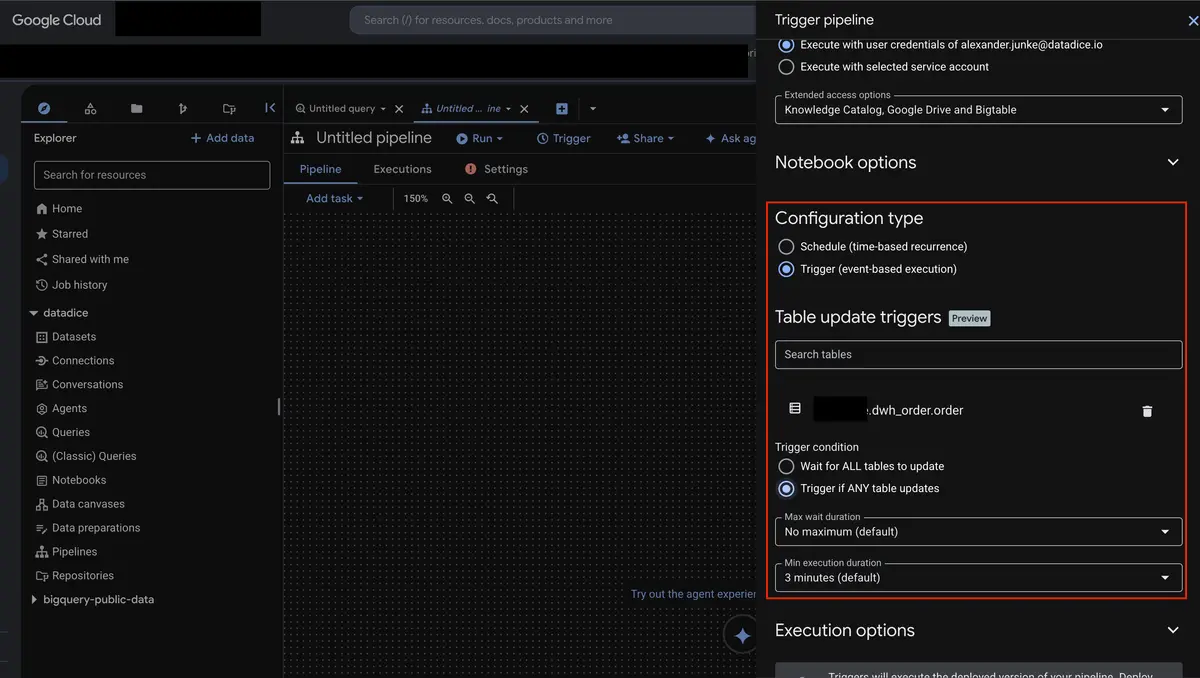
- Specify one or multiple tables to monitor, with conditions to trigger execution either when any table updates or only when all listed tables have updated.
- Define optional minimum execution durations to avoid over-triggering and maximum wait durations to ensure timely processing even during low update activity.
How to Set Up Trigger-Based Scheduling
- In the Google Cloud console, open BigQuery and select your pipeline from the Explorer pane.
- Click "Trigger" in the top action bar to open the schedule configuration pane.
- Enter a trigger name and configure your authentication credentials (service account or user credentials).
- Set the Configuration Type to Trigger (event-based execution).
- Search for the BigQuery table or tables you want to monitor for updates.
- Select your preferred Trigger Condition (Wait for ALL tables to update or Trigger if ANY table updates).
- Optionally configure Min Execution Duration and Max Wait Duration settings.
- Click "Create schedule" to save and activate your automated pipeline trigger.
More information can be found here.
Conversational Analytics update
Conversational Analytics in BigQuery is now Generally Available. Having moved out of preview, this feature allows users to query, analyze, and explore their data through natural language chat interactions with AI agents. With this release, Google has consolidated and expanded the feature set to provide more control, transparency, and regional compliance.
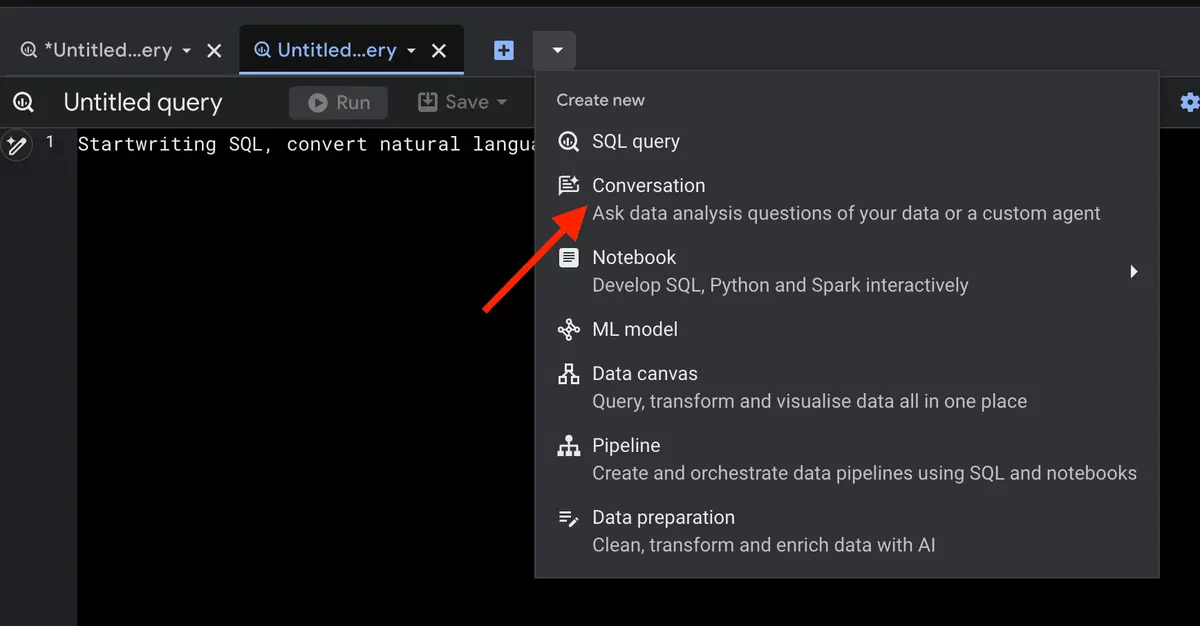
I just want to mention the tool again with all its features it gains over time:
- Model Selection Control: Administrators can configure whether an agent uses strictly generally available models or a combination of preview and GA models.
- Dynamic Thinking Mode: Users can switch the thinking mode of an agent directly within an ongoing conversation to alter how complex reasoning is performed.
- Proactive Clarification: AI agents can now ask clarifying questions when an input prompt is ambiguous before executing complex queries.
- Context Citations: Responses provided by agents now include direct citations to show the underlying source data and context used to generate answers.
- Parameterized Verified Queries: Support for parameters has been added to verified queries, allowing for safer and more flexible execution.
- Integrated AI Functions: Agents can natively execute AI standard functions, including
AI.KEY_DRIVERS,AI.IF,AI.SCORE,AI.CLASSIFY,AI.SIMILARITY, andAI.SEARCH. - Multi-Region Support (MREP): Full support for US MREP and EU MREP locations ensures strict governance over where agent conversation resources are stored and where ML processing occurs.
More information can be found here.
New Gemini Cloud Assist features
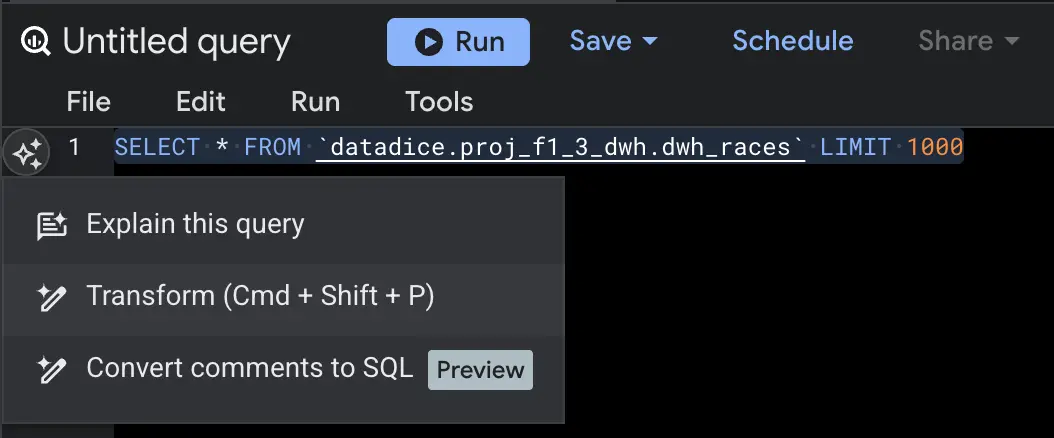
Google has expanded the capabilities of Gemini Cloud Assist in BigQuery. I just want to mention them briefly:
- Analyze SQL queries and receive actionable recommendations to improve query performance (available for BigQuery edition users).
- Monitor overall execution performance, analyze slot capacity, and identify cost-optimization opportunities across your BigQuery workloads.
- Analyze data lineage to understand data dependencies, transformations, and asset origins.
- Configure and automate query schedules directly through natural language interactions.
Further changes
There are a few other improvements for BigQuery I want to mention:
- Knowledge Catalog Metadata Transfers: The BigQuery Data Transfer Service now supports transferring metadata from Oracle and MySQL data sources directly into Knowledge Catalog.
- Column Resizing in BigQuery Studio: Users can now manually adjust table column widths across various BigQuery Studio listings—such as datasets, repositories, job history, and connections—by hovering over and dragging the column dividers to their preferred width.
- Gemini Code Assist for Job Troubleshooting: Gemini Code Assist is now directly integrated into the BigQuery Jobs explorer, Job details, Job history, and Capacity management pages, allowing users to troubleshoot issues and analyze query performance.
- Fluid Scaling for Autoscaling Reservations: BigQuery has introduced fluid scaling, which enables per-second billing with no minimum duration requirement for autoscaling reservations.
Dataform
No further release for Dataform.
Data Studio
Security improvements (Pro)
Google has introduced new security and compliance features specifically designed for Data Studio Pro users.
Possibilities:
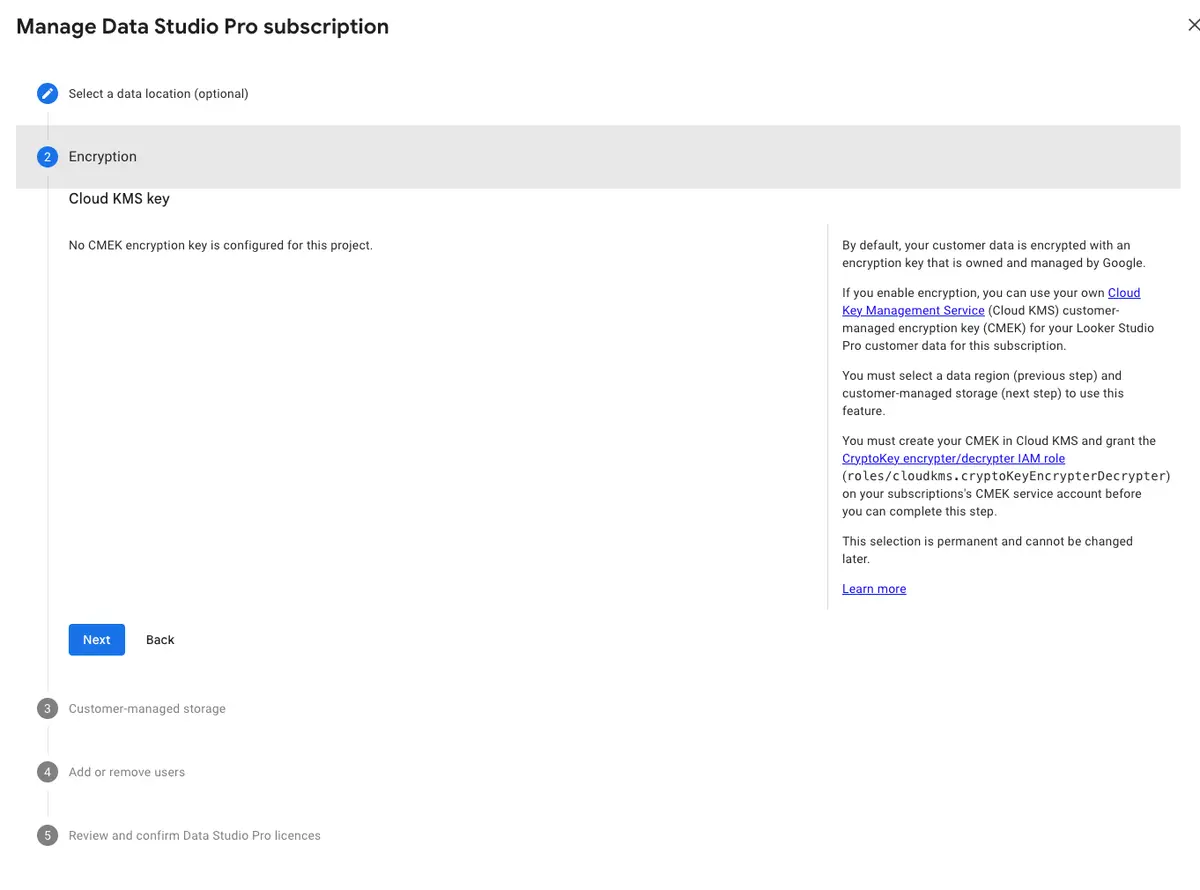
- Customer-Managed Encryption Keys (CMEK): Organizations can now protect their Data Studio Pro assets by utilizing their own cryptographic keys instead of default Google-managed keys.
- Customer-Managed Storage: This feature allows users to store file uploads within their own Google Cloud Storage buckets and keep data extracts inside their own BigQuery datasets.
- Data Residency: Administrators can strictly control data storage by ensuring that assets and data are kept physically within a specific geographical area.
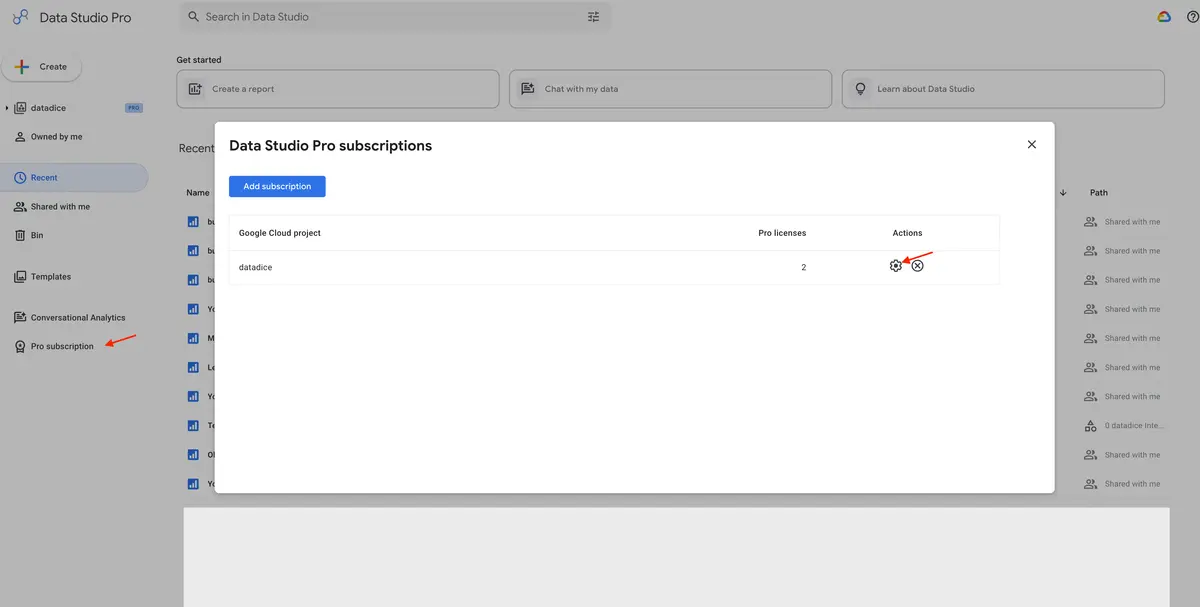
How to Configure the New Security Features
- Navigate to the administrative settings panel of your Data Studio Pro account.
- In “Select a data location” you can choose your desired location.
- In “Encryption” set up your CMEK.
- In “Customer managed storage” connect your Cloud Storage buckets and BigQuery datasets to route file uploads and data extracts to your own infrastructure.
Viewer data refresh
Report viewers can manually refresh report data now. The Report Editor just need to activate the corresponding option in the report settings:
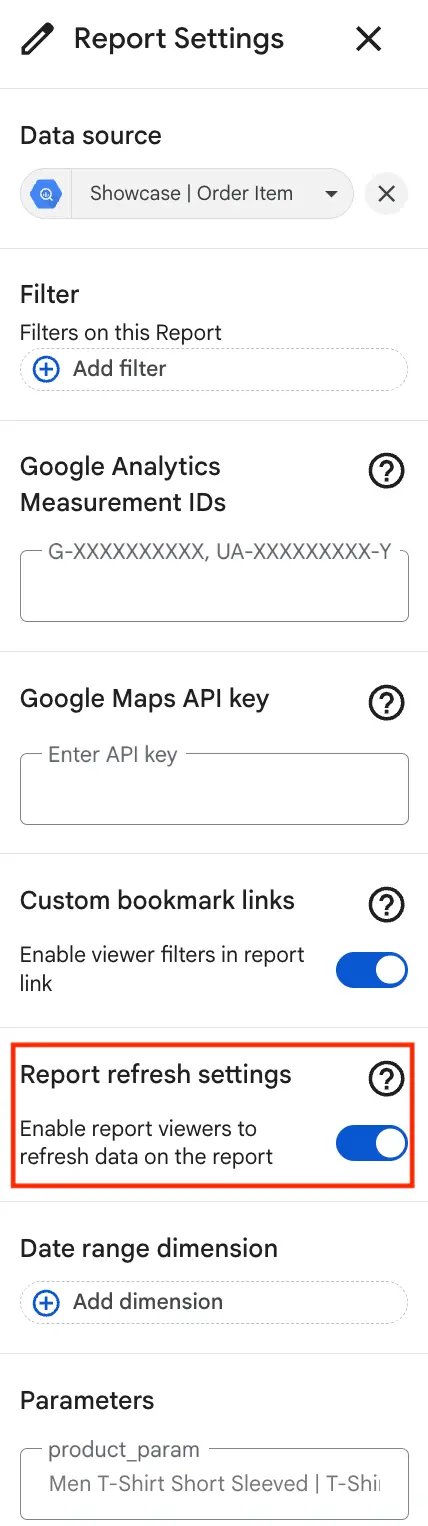
Then the viewer can update the data via the 3-dot menu. This update is a huge one. If you have data that is updated on a minute-by-minute or hourly basis, you can give the viewer control over when to update the data in the dashboard.
Note: We tried the setup, but even after 1 hour of activation, readers were not able to update the data on their own.
Google Analytics
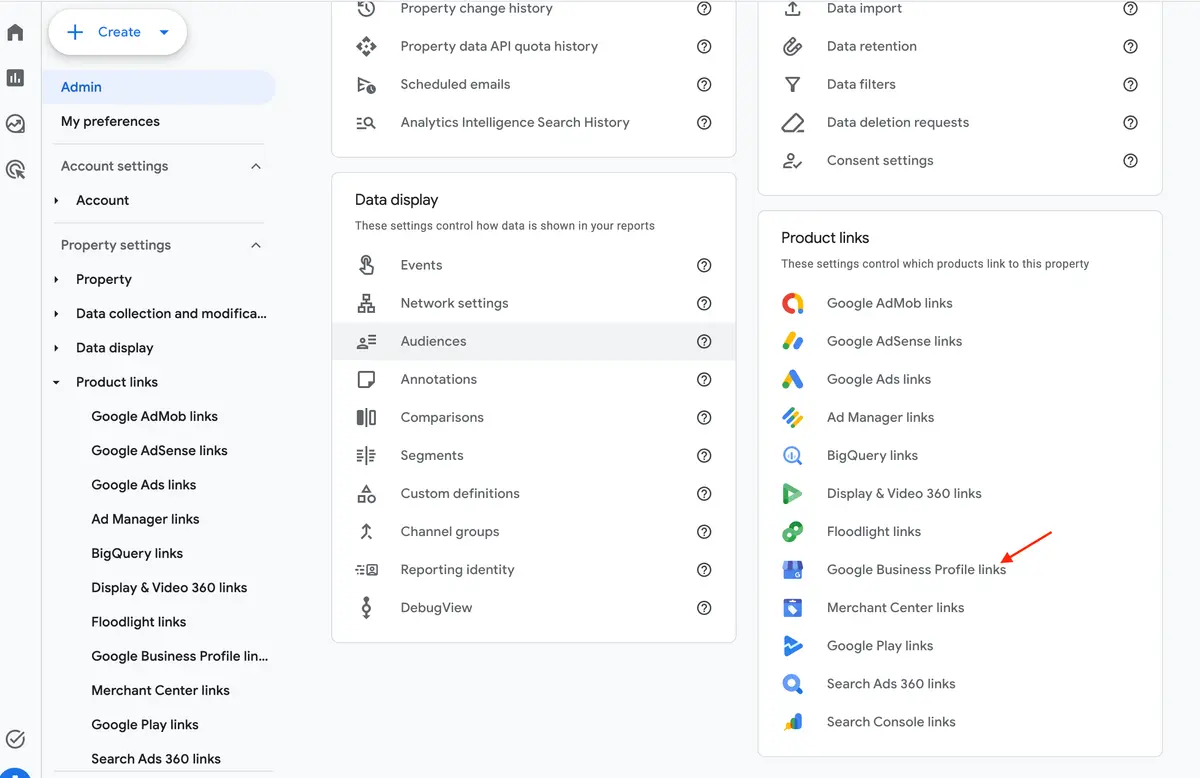
Google Business Profile Link
Google has introduced a native integration between GA4 and Google Business Profile (GBP). This integration lets you centrally report on your local business, website, and app metrics together.
Important details regarding this new feature include:
- You must have an Editor or Administrator role in GA4, and Owner or Manager permissions for the Google Business Profile.
- A new dedicated Google Business Profile reporting collection is automatically added to your Reports menu once the link is active.
- It tracks 7 core GBP metrics: interactions, website clicks, phone calls, direction requests, messages, bookings, and menu views.
- Profile metrics are limited to a rolling 6-month retention window within GA4.
New Source Group field and Source Platform improvements
Google has introduced a new dimension concept called the Source Group field, alongside updates to the existing Source Platform classifications. This update is designed to consolidate messy and disparate source values from common online platforms into clean, high-level reporting values for improved performance and attribution analysis.
Key facts:
- Standardizing source dimension values simplifies cross-channel reporting within the advertising section.
- Third-party networks like TikTok, Pinterest, and Amazon now feature the same level of reporting granularity as Google inventory like YouTube, Search, and Maps.
- Disparate values such as
igor%instagram%are automatically bundled into clean categories like Instagram. - Automated grouping for emerging AI-driven traffic sources.
- The Source Group field is populated retroactively.
You can easily select the dimension “Source Group” or “Source Platform” in e.g. your Explorations.
Note: So far, the field “Source Group” is not available yet in the properties I have access to.
Hostname filter

This update allows users to exclude events from their data collection based on specific hostnames. Users can ensure that any data originating from an unapproved domain is blocked from entering the property.
How to set it up:
- In the Admin Section > Data Collection and modification > Data Filters
- Create a new filter
- Select “Web hostname traffic”
- Enter the Hostname (with Match type)
- You can decide if you want to mark events from this domain as testing or if you want to exclude them entirely from the property
Google Tag Manager
Google Tag gateway via new services
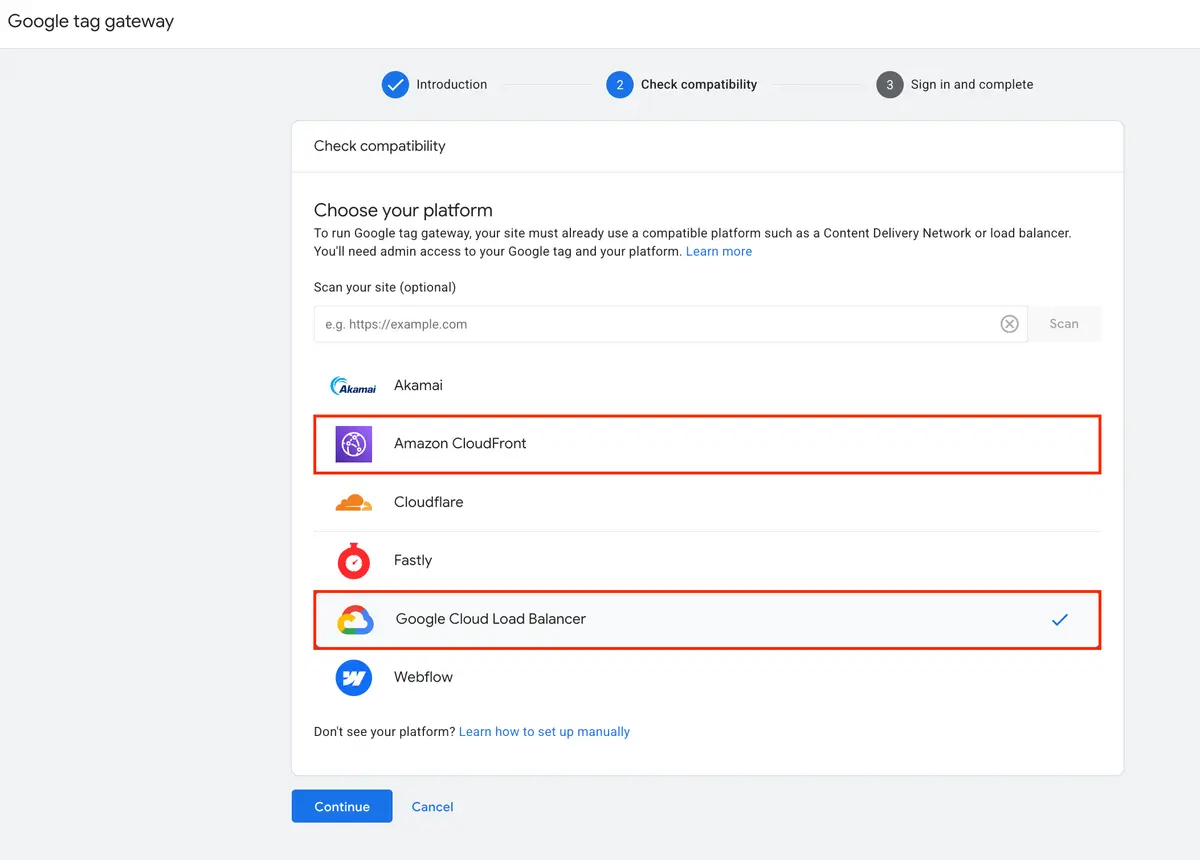
Google has expanded the configuration options for the Google Tag Gateway for advertisers, which can now be integrated via both Amazon CloudFront and Google Cloud Platform (GCP).
- The Amazon CloudFront integration allows you to use it as your content delivery network (CDN) to establish a first-party data pathway.
- Alternatively, the GCP integration allows you to leverage the Global external Application Load Balancer to route tracking data securely through your first-party web infrastructure before relaying it to Google.
To deploy the GCP integration, complete the following steps:
More information can be found here for Amazon CloudFront and here for GCP Load Balancer.
Further Links
This post is part of the Google Data Analytics series from datadice and explains to you every month the newest features in BigQuery, Data Studio, Google Analytics, and Google Tag Manager.
Check out our LinkedIn account to get insights into our daily working life and get important updates about BigQuery, Data Studio, and marketing analytics.
We also started with our own YouTube channel. We talk about important DWH, BigQuery, Data Studio, and many more topics. Check out the channel here.
If you want to learn more about how to use Google Data Studio and take it to the next level in combination with BigQuery, check our Udemy course here.
If you are looking for help to set up a modern and cost-efficient data warehouse or analytical dashboards, send us an email to hello@datadice.io, and we will schedule a call.