In this blog post, I want to summarize the new releases from the Google tools, that we use daily in datadice. Therefore I want to give an overview of the new features of BigQuery, Looker Studio, Google Analytics and Google Tag Manager. Furthermore, I will focus on the releases that I consider to be the most important ones and I will also name some other changes that were made.
If you want to take a closer look, here you can find the Release Notes from BigQuery, Looker Studio, Google Analytics & Google Tag Manager.
BigQuery
Computing and pricing changes
There are changes for flat-rate and on-demand pricing for BigQuery on the 5th of July 2023.
On-demand: The costs per TB data read will increase from 5$ to 6,25$
New edition models: There will be 3 new editions available: Standard, Enterprise, and Enterprise Plus. These are kind of a mixture between on-demand and flat rates because you are paying per slot and hour in this case. The different models have differences in their pricing and computing model, data governance, storage encryption, and many more.
General Information you can find here.
Information about the pricing you can find here
Small BigQuery ML changes
BigQuery ML is a good starting point for discovering how ML works. It is easy to use but at the end not as complex as other ML services.
Google made some adjustments for BigQuery ML I want to mention, and you can take a closer look at it if you are interested:
- You can change the used XGBoost or Tensorflow version, by using the option xgboost_version (Default: 0.9) or tf_version (Default: 1.15)
- With the option instance_weight_col, you can define a column that contains the weights for the dataset
- Hosting models remotely on Vertex AI Prediction
- The model option OPTIMIZATION_OBJECTIVE accepts the values MAXIMIZE_PRECISION_AT_RECALL and MAXIMIZE_RECALL_AT_PRECISION
- And many more
Dataform
Query Preview
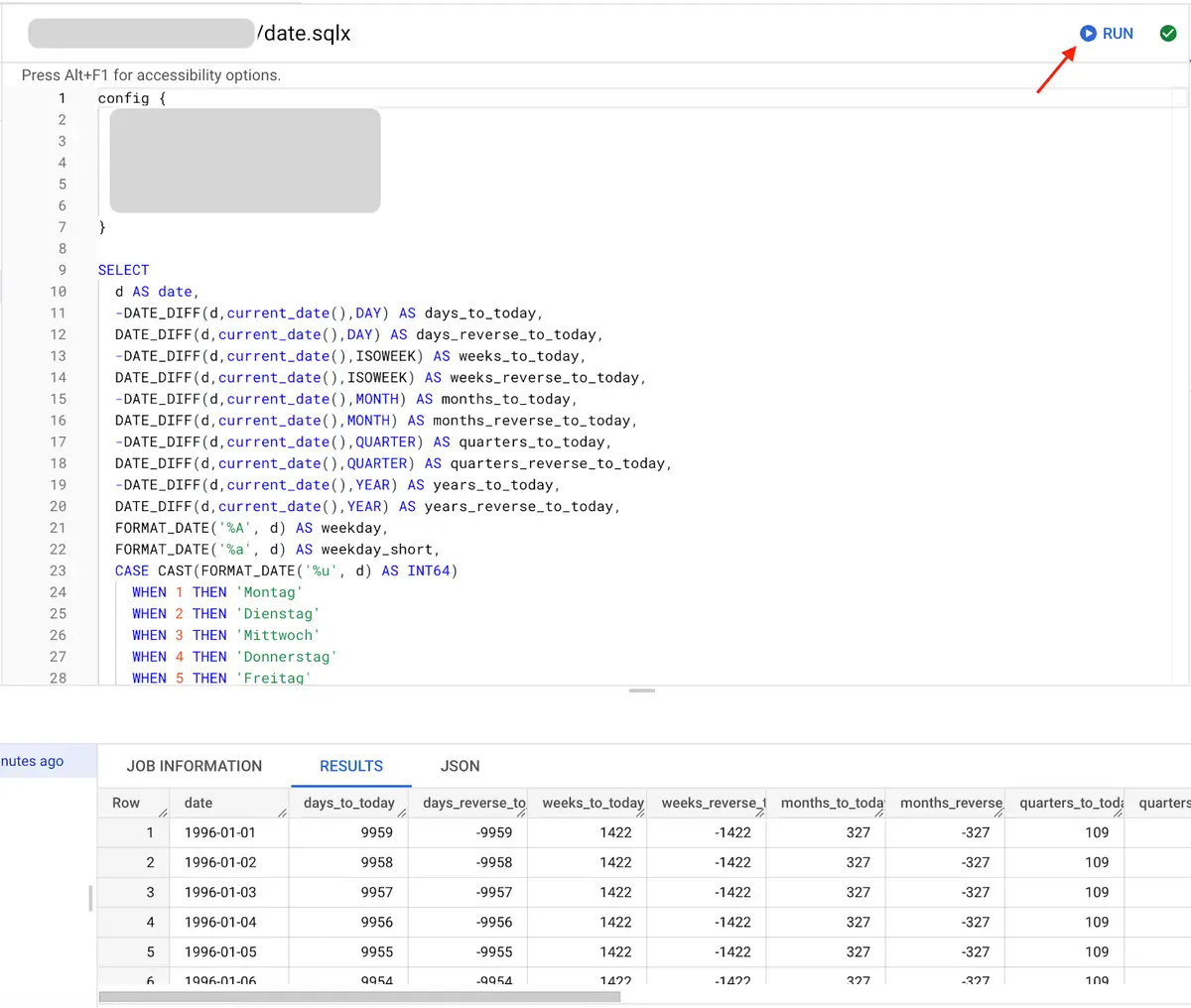
The Preview methods in Dataform were quite limited. Now you can run the content of one single SQLX file and see the results immediately.
For that, you go to the SQLX File and click on RUN in the top right corner. In the bottom area, you get then the result in a table or JSON format. Furthermore, it shows the usual job information as you know from BigQuery.
 Create custom definition
Higher limits for Properties and Sub-Properties in an Account
A quick one, Google increased some limits:
- The number of properties per account increased from 100 to 2000
- The limit of sub-properties per property is 400 now
Google Tag Manager
GA4 data to regional data centers
This update is again a nice push for the server-side tagging. When you look at a request from a server-side GTM container to GA4 it starts like the following:
https://region1.google-analytics.com/g/collect?v=2&tid=...
So the data gets sent to the region1 server. To determine which server would be the best, it uses the IP address and then masks this information before any logging or saving.
This update should lead to better performance and security.
Further Links
This post is part of the Google Data Analytics series from datadice and explains to you every month the newest features in BigQuery, Data Studio, Google Analytics and Google Tag Manager.
Follow us on LinkedIn for insights into our daily work and important updates on BigQuery, Data Studio, and marketing analytics.
Subscribe to our YouTube channel for discussions on DWH, BigQuery, Looker Studio, and Google Tag Manager.
If you are interested in learning BigQuery from scratch, get access to our free BigQuery Course
Elevate your skills with Google Data Studio and BigQuery by enrolling in our Udemy course.
Need help setting up a modern, cost-efficient data warehouse or analytical dashboard? Email us at hello@datadice.io to schedule a call.